
Create raised-line drawings automatically and expand them by hand
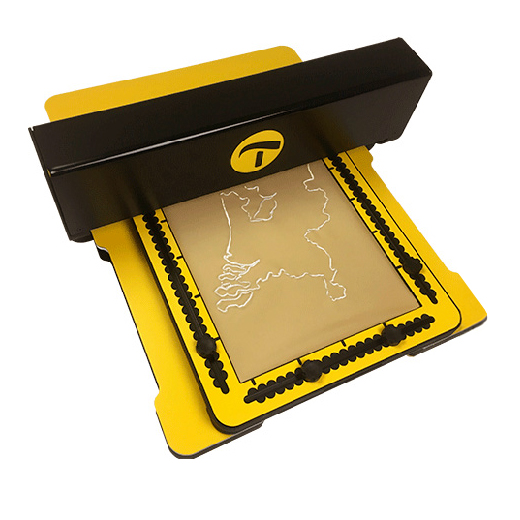
The Motorised Drawing Arm (MDA) is a computer-controlled stylus, it automatically creates accurate raised-line drawings on the TactiPad drawing board. The images are generated using the built-in drawing tools or created with external software such as TactileView or any application that exports scalable vector graphics (SVG) files.
Once the MDA has sketched the drawing, you can enhance it by adding freehand lines or other elements by using the TactiPad tools. The result: richer tactile graphics with greater accuracy and a personal touch, created in less time.
How it works
The TactiPad sits on the base of the MDA. Motors move the arm forwards and backwards while moving the stylus from left to right across the surface of the TactiPad. At the start of each line, a motor gently presses the stylus onto the TactiPad. As the arm moves, tactile lines are created. When a line is completed, the stylus lifts automatically. The arm then moves to the starting point of the next line or returns to its rear ‘home position’.
Applications
Education
The MDA helps teachers and students work with tactile diagrams in a structured way. Exercises can be divided into clear steps, making complex graphics easier to understand.
- Sketch images from a smartboard or tablet onto one or multiple TactiPads.
- Develop your drawing skills by copying, expanding and modifying basic objects.
- Create maps by gradually building up the layers of geographic information.
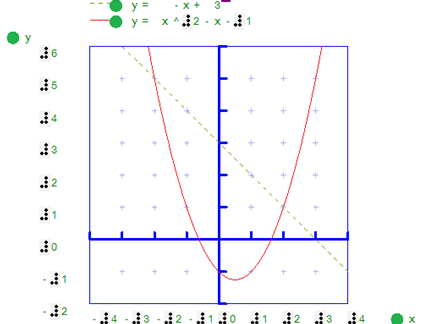
- Study graphs, geometry, physics diagrams and numerical data.
Fun, creativity and games
By combining automated sketching with manual drawing, the MDA makes many creative activities accessible.
- Print simple designs from the MDA catalogue, such as animals, flowers, shapes.
- Complete partially drawn images.
- Play drawing games such as “Connect the Dots”.
- Generate gaming boards for various games.
Professional use
The MDA can also support professional workflows by producing clear tactile diagrams that can be refined and expanded at any stage. It encourages collaboration between visually impaired and sighted colleagues.
- Workflow diagrams
- Statistical graphics
- Graphs and charts

Flexible connectivity
Connectivity options include:
- USB connection
- Built-in Wi-Fi hotspot
- Wired or wireless network connection
Using a browser on a phone, tablet or computer, users can access the MDA’s built-in web interface. Images from the Examples or Interactive pages can be sketched immediately. Additional images can be created using software such as TactileView or any program that exports SVG files. These can be uploaded via the browser or transferred using a USB drive. Users can also collaborate with others to build shared libraries of tactile designs.
Product characteristics
- Comes with a built-in website providing countless customisable, ready-to-sketch graphics.
- Converts SVG images into tactile graphics.
- User interface available in multiple languages.
- Measurement system selectable: metric or Imperial (US).
Dimensions
Width: 42 cm (16.5 in)
Depth: 49 cm (19 in)
Base height: 3 cm (1.25 in)
Arm height: 14 cm (5.5 in)
Weight: approx. 7.5 kg (16.5 lb)
Power supply 110–240 V, 50–60 Hz
The MDA comes with 400 sheets of tactile drawing foil. Compatible with existing TactiPad drawing boards (available separately if you don’t already own one).